
Overview
With siera, users ingest Analysis Results Standard (ARS) metadata and auto-generate R scripts that, when run with corresponding ADaM datasets, provide Analysis Results Datasets (ARDs).
The CDISC Analysis Results Standard is a foundational standard that facilitates automation, reproducibility, reusability and traceability of analysis results data.
ARS metadata is officially represented using JSON format. Such a JSON file contains all relevant metadata to be able to calculate the Analysis Results for a specific Reporting Event. This metadata includes (but is not limited to):
- Analysis Sets (e.g. SAFFL = “Y”)
- AnalysisGroupings (e.g. group by Treatment)
- DataSubsets (e.g. filter by Treatment-Emergent Adverse Events)
- AnalysisMethods (e.g. calculate ‘n’, ‘Mean’, ‘Min’, ‘Max’, ‘Q1’, ‘Q3’)
Applying all these concepts to ADaM input data, yields Analysis Results in Dataset format (ARDs).
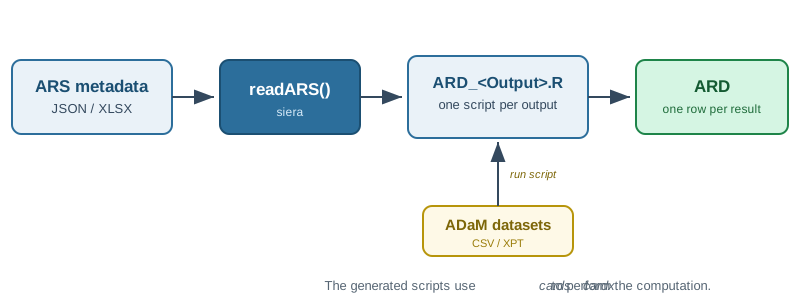
readARS(), which writes one R script per output; each script runs against ADaM datasets to produce an ARD.Within the pharmaverse ecosystem, siera sits between ARS metadata and the cards package: ADaM datasets are typically built with admiral, siera generates the cards/cardx code that computes the ARD, and packages such as gtsummary and tfrmt turn that ARD into final tables.
Installation
siera can be installed from CRAN with:
install.packages("siera")The development version can be installed from Github using
devtools::install_github("clymbclinical/siera")Usage
The siera package has one main function, called readARS. This function takes ARS metadata as input (JSON format), and makes use of the various metadata pieces to populate R scripts, which an be run as-is to produce ARDs. One R script is created for each output (table) as defined in the ARS metadata for the reportingg event.
In order to make use of this function, the following are required as arguments:
- A functional ARS file, representing ARS Metadata for a Reporting Event (JSON)
- An output directory where the R scripts will be placed
- A folder containing the related ADaM datasets for the ARDs to be generated, supplied as CSV (
.csv), SAS transport (.xpt) or CDISC Dataset-JSON (.json) files
siera picks the reader for each ADaM dataset from its file extension — .csv files are read with readr::read_csv(), .xpt files with haven::read_xpt() and .json files with datasetjson::read_dataset_json() — so no extra argument is needed.
Every analysis in a generated script reads as analysis set, data subset, method, and a final call to siera::ars_stamp(), which links the result to the ARS metadata (AnalysisId, MethodId, OutputId and the grouping identifiers). The generated scripts therefore need the siera package to be installed when run. Use readARS(code_style = "expanded") if you prefer scripts that spell out that linking step in plain dplyr code; both styles produce an identical ARD.
ARS metadata in Excel (.xlsx) format is deprecated: readARS() still reads a workbook for now, with a warning, but a future release will read JSON only. Convert each workbook once with ars_xlsx_to_json() (an R-native equivalent of CDISC’s excel2ars.py, itself deprecated and due to be removed together with .xlsx input) and keep the resulting .json file.
To also write each ARD as a CDISC Dataset-JSON file (ARD_<OutputId>.json) when its script runs, call readARS(..., output_format = "datasetjson"); column_labels lets you supply your own variable labels. See the Exporting ARDs as Dataset-JSON vignette.
See the Getting Started vignette for examples and more detail on the process.